Post-quantum passkey test
Create a post-quantum passkey with ML-DSA
Passkeys are starting to move from elliptic curves to ML-DSA, a signature built to resist quantum computers. You do not need new hardware to see one: Chrome's virtual authenticator creates it. The debugger asks for ML-DSA only and shows which variant came back.
- About 3 minutes
- Chrome 157 or newer
- No security key needed
What the test checks
Algorithm
Which ML-DSA variant the authenticator picked: 87, 65 or 44. The strongest is asked for first.
Key size
The public key is 1,312, 1,952 or 2,592 bytes, checked against FIPS 204.
No fallback
The request lists no classic algorithm, so an authenticator without ML-DSA has to fail.
Login
That the passkey signs in, and which variant the signature size points to.
Create a post-quantum passkey in four steps
- 1
Add a virtual authenticator in Chrome
Open the prepared testOpen the debugger in Chrome and open DevTools. In the three-dot menu choose More tools, then WebAuthn, and tick Enable virtual authenticator environment.
Add an authenticator with protocol
ctap2, transportinternal, and both Supports resident keys and Supports user verification ticked. Keep DevTools open: the virtual authenticator only answers while it is. - 2
Check the request
The link sets Public key algorithms to ML-DSA-87, ML-DSA-65 and ML-DSA-44, in that order. The order is the preference, and an authenticator takes the first one it supports.
In the generated options they appear as
pubKeyCredParamswithalg-50, -49 and -48. ES256, EdDSA and RS256 are left out on purpose.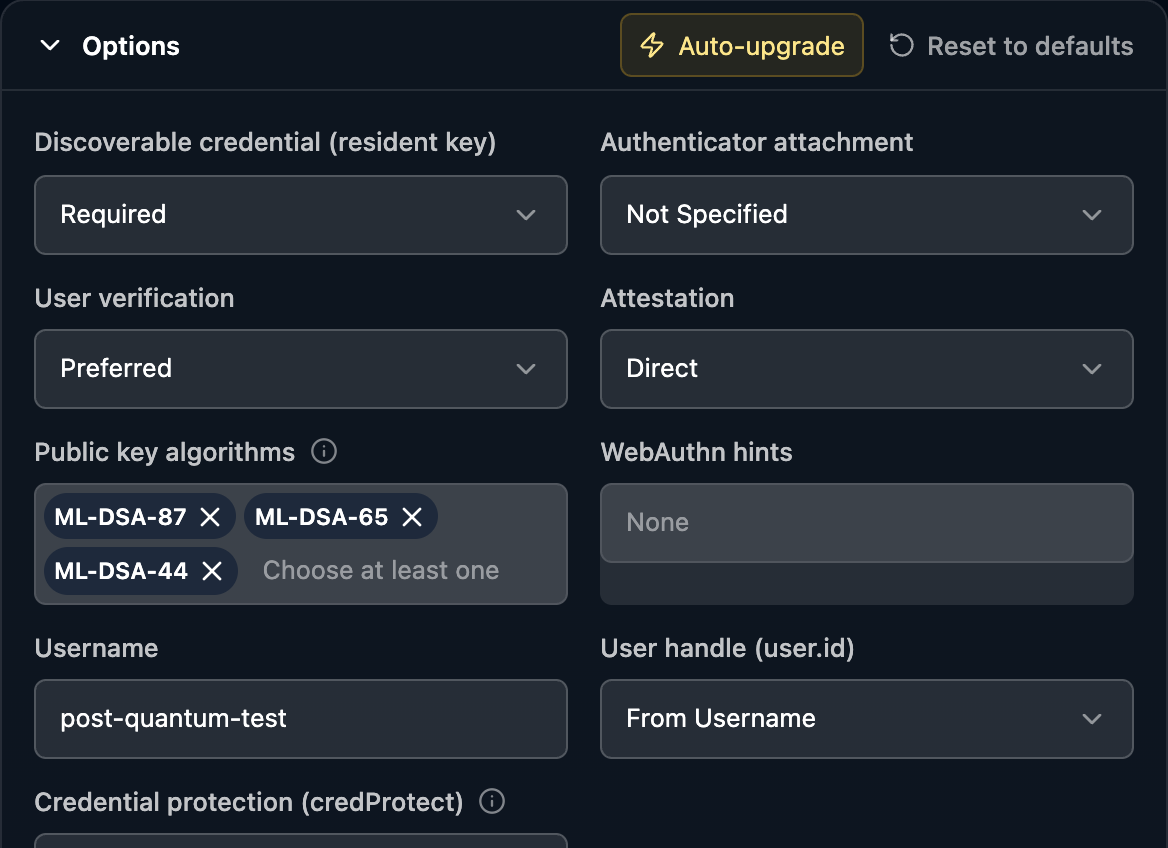
- 3
Create the passkey
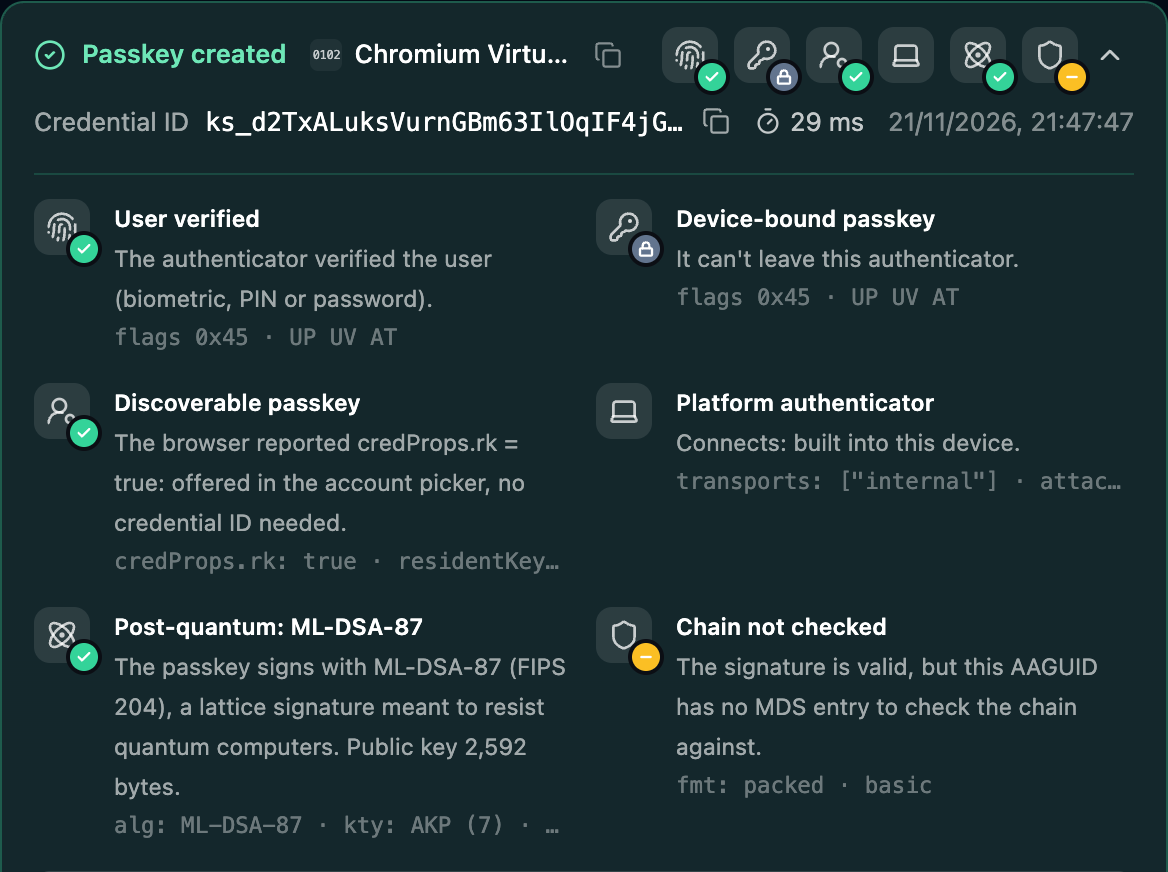
Click Create passkey. The virtual authenticator answers at once, without a prompt. The result names it as Chromium Virtual Authenticator and adds a tile with an atom icon: Post-quantum: ML-DSA-87, public key 2,592 bytes.
Chain not checked is expected here. The virtual authenticator has no entry in the FIDO Metadata Service, so there is nothing to check its attestation against.
- alg: ML-DSA-87
- The algorithm of the new key, COSE number -50.
- kty: AKP (7)
- The key type ML-DSA keys use, defined in RFC 9964.
- 4
Sign in with it
Switch to Authentication and click Log in with passkey. The decoded response gives the size of the signature, which names the variant on its own: 2,420 bytes for ML-DSA-44, 3,309 for ML-DSA-65 and 4,627 for ML-DSA-87.
Then try your own authenticator
Remove the virtual authenticator in DevTools and run the same test again. Now the answer comes from your password manager, your device or your security key.
The registration fails
The authenticator supports none of the three ML-DSA variants, and the request offers nothing else.
This is the expected answer for most authenticators today. 1Password creates ML-DSA passkeys from version 8.12.44.
A passkey is created, with a red algorithm tile
The provider ignored the list and created a classic key, for example ES256. Apple Passwords in Safari 27 does this.
A server has to reject such a registration: the algorithm was not among the ones it asked for.
Chain not checked
The authenticator has no entry in the FIDO Metadata Service, as is the case for the virtual authenticator.
Nothing to fix for a test. For real keys the entry is what a server checks attestation against.
The virtual authenticator stopped answering
DevTools was closed, or the page was opened in another tab. The environment belongs to one tab.
Reopen DevTools on this tab and enable the environment again.
What a quantum computer breaks in a passkey and where ML-DSA stands: Are passkeys quantum safe? ML-DSA passkeys explained.
Questions
- What is a post-quantum passkey?
- A passkey whose key pair uses a signature algorithm designed to resist quantum computers. For WebAuthn that is ML-DSA (FIPS 204), a lattice-based signature in three strengths: ML-DSA-44, ML-DSA-65 and ML-DSA-87, with the COSE algorithm numbers -48, -49 and -50.
- Are today's passkeys quantum safe?
- Most passkeys sign with ES256, which rests on elliptic curves. A large enough quantum computer could derive the private key from the public key. No such machine exists today, and a passkey can be replaced by a new one, which is why the move to ML-DSA can happen step by step.Are passkeys quantum safe?
- Which authenticators create ML-DSA passkeys?
- Chrome's virtual authenticator in DevTools (checked with Chrome 157) and 1Password from version 8.12.44. The FIDO Metadata Service lists one model that reports ML-DSA, CanoKey Canary, which is not certified. Most security keys and platform authenticators do not offer it yet.
- What does my server need for ML-DSA?
- A WebAuthn library that verifies ML-DSA signatures and reads the new key type, and room for larger values: an ML-DSA-87 public key is 2,592 bytes and a signature 4,627 bytes, against 65 and about 70 for ES256. The debugger uses @simplewebauthn/server 14 on Node 24.
Stuck on a result? Ask in the passkeys community on Slack and share the session link.
Corbado Observe
The debugger shows one login. Observe shows all of them.
The same client-side detail for every login in production, so you see where users fail before support tickets do.
Every authentication method
Per-user journeys
Device readiness
Your existing IdP