WebAuthn Signal API test
WebAuthn Signal API test: try signalUnknownCredential
When your server deletes a passkey, the user's password manager still offers it and the next login fails. The Signal API tells the provider about it. Create a test passkey, send signalUnknownCredential() and check whether your provider removed it.
- About 2 minutes
- Chrome 132+ or Safari 26+
- Google Password Manager or iCloud Keychain

What the test checks
Browser support
Whether this browser has PublicKeyCredential.signalUnknownCredential().
Provider support
Whether your passkey's provider acts on the signal in this browser.
Removal
That the passkey is no longer offered at the next login.
Side effects
Known issues, such as other accounts' passkeys disappearing on iOS 26.
Test the Signal API in four steps
- 1
Create a test passkey
Open the prepared testThe link prepares a registration with the username
signal-api-test. Click Create passkey and confirm with your screen lock. Use a passkey you can lose: the test removes it. - 2
Switch to Deletion
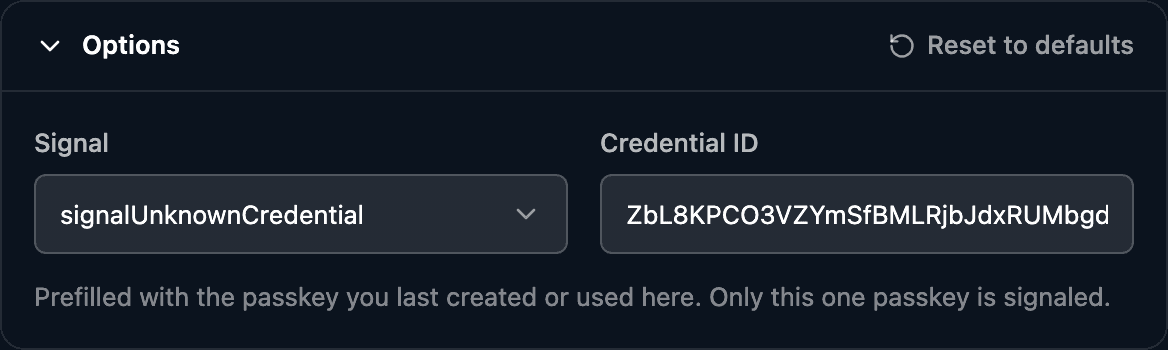
Choose Deletion. The Credential ID is prefilled with the passkey you just created. The debugger sends this call:
await PublicKeyCredential.signalUnknownCredential({
    rpId: "www.passkeys-debugger.io",
    credentialId: "<the passkey's credential ID>",
});
Under the run button a hint says whether your passkey's provider acts on the signal in this browser, based on the AAGUID from the registration.
- 3
Send the signal
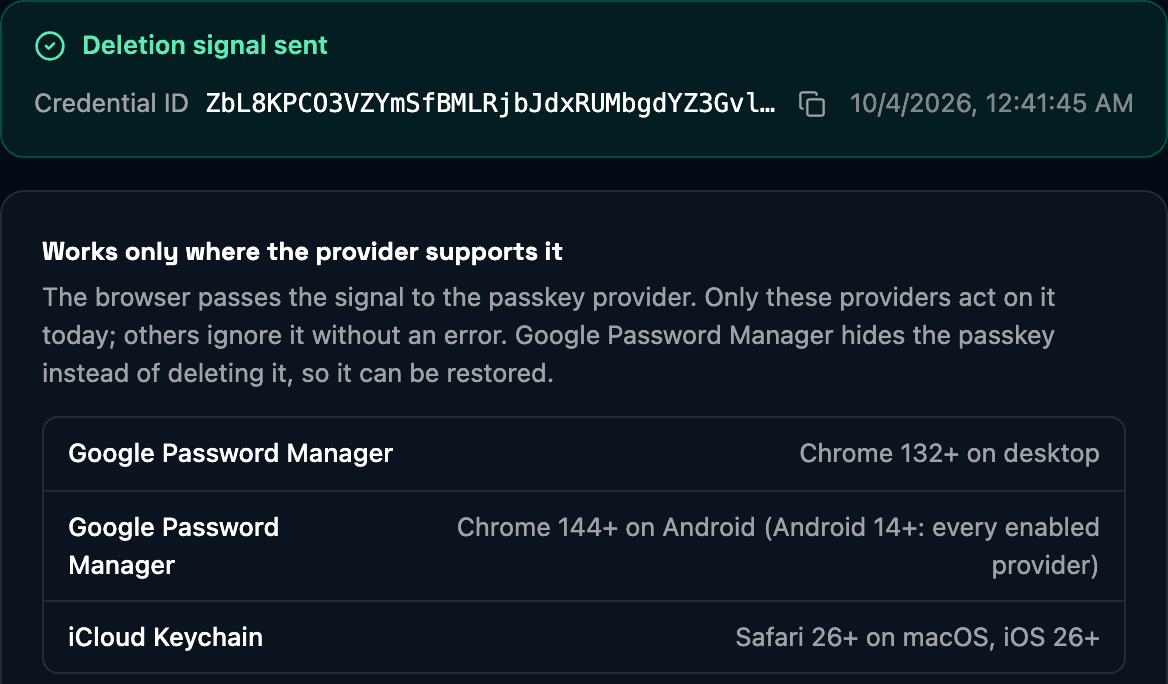
Click Delete passkey. The browser passes the signal to the provider and resolves the promise. It returns nothing, so the debugger can only confirm that the signal was sent.
In this run Chrome's virtual authenticator held one passkey before the signal and none after it.
- 4
Check that it is gone
Switch to Authentication, clear Credential ID so the browser lists every passkey and click Log in with passkey. A removed passkey is no longer offered. Google Password Manager hides it instead of deleting it, so it can be restored.
When the passkey stays
The Signal API is a hint, not a command. These are the usual reasons a passkey survives it.
Deletion is not supported here
The browser has no signalUnknownCredential(). The Deletion mode then shows Not supported here.
Use Chrome 132+ or Safari 26+.
Signal sent, passkey still offered
The provider ignores the signal, or the credential ID or RP ID doesn't match the passkey.
Check the provider hint and that the Credential ID is the one from the registration.
The promise never resolves in Safari
WebKit bug 298951 in Safari 26.
The debugger stops waiting after 3 seconds. Check the result with a login.
Other passkeys disappeared on iOS 26
On iOS and macOS 26 a removal can also delete passkeys of other accounts on the same site.
Test with a throwaway account and read the details before you ship it.
All three methods and how sites use them: How the WebAuthn Signal API works. The iOS issue: Signal API passkey deletion bug on iOS.
Questions
- What is the WebAuthn Signal API?
- Three methods a site calls to keep the user's password manager in sync with its server: signalUnknownCredential() for a passkey the server deleted, signalAllAcceptedCredentials() for the full list of an account's valid passkeys and signalCurrentUserDetails() for a changed username or display name.
- Does signalUnknownCredential delete the passkey?
- It asks the passkey provider to. The promise resolves once the browser accepts the signal, whether or not anything was removed. Google Password Manager hides the passkey so it can be restored; iCloud Keychain removes it. Other providers may ignore the signal.
- Which browsers support the WebAuthn Signal API?
- Chrome 132+ on desktop and Chrome 144+ on Android pass the signal to Google Password Manager (on Android 14+ to every enabled provider). Safari 26+ on macOS and iOS 26+ pass it to iCloud Keychain.
- How does a user delete a passkey?
- In their password manager, for example the Passwords app on iPhone and Mac or Google Password Manager. The Signal API is for sites: it removes passkeys the server no longer accepts, so users don't pick a dead one at the next login.
Related
- Automatic passkey upgrade testTurn a password login into a passkey without a prompt, and see why it failed.
- Platform authenticator testFace ID, Touch ID, Windows Hello and Android, synced or device-bound.
- Authentication observabilityWhere logins fail outside your server logs and the KPIs that show it.
Stuck on a result? Ask in the passkeys community on Slack and share the session link.
Corbado Observe
The debugger shows one login. Observe shows all of them.
The same client-side detail for every login in production, so you see where users fail before support tickets do.
Every authentication method
Per-user journeys
Device readiness
Your existing IdP